
Flow Studio
Flow Studio is Autodesk’s AI-powered creative workflow for character and VFX production. It helps teams move faster through character creation, rigging, animation, tracking, masks, character passes, and CG integration into live-action scenes.
Disclosure
AI Velocity Lab may receive an affiliate commission when you sign up through links on this page. This does not affect our editorial review process.
Velocity Highlights
- Fastest win: turn footage, text, or image inputs into production-ready 3D/VFX building blocks faster
- Great for: filmmakers, VFX teams, game/scene prototyping, and character-driven campaigns
- Watch for: this is a production/VFX workflow, not a simple talking-head avatar generator
- Useful when: you need AI-assisted character setup, animation, compositing, or export into a 3D stack
Pricing
Subject to change — visit the tool’s pricing page for current details.
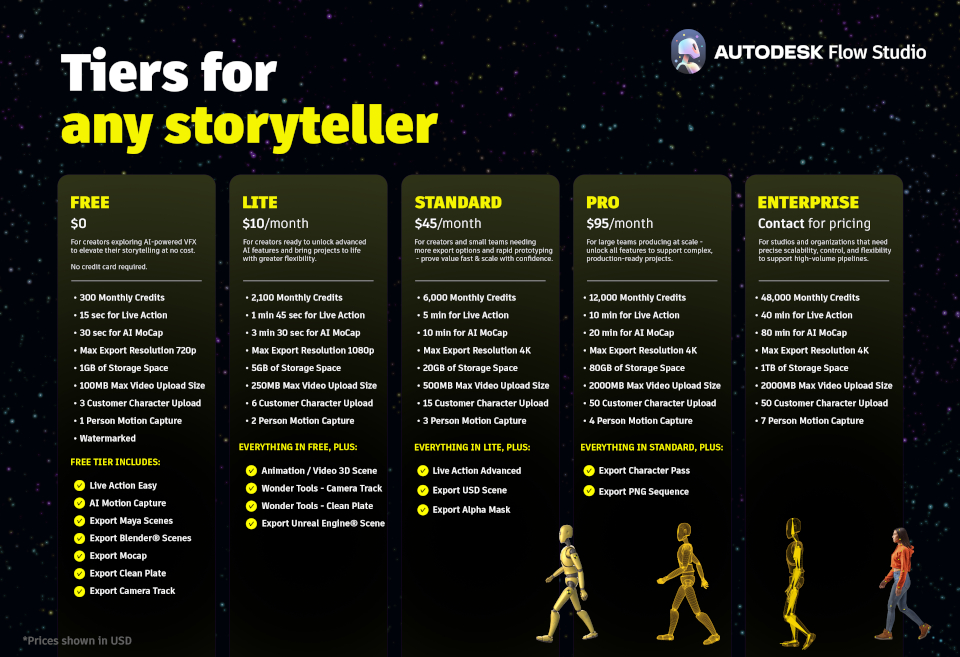
| Plan | Price (monthly) |
|---|---|
| Free | $0/mo; 300 credits/mo |
| Lite | $10/mo or $80/yr; 2,100 credits/mo |
| Standard | $45/mo or $360/yr; 6,000 credits/mo |
| Pro | $95/mo or $765/yr; 12,000 credits/mo |
Enterprise is contact-sales pricing and is listed with 48,000 credits/month. Pro is also included in Autodesk’s Media & Entertainment Collection.
Use cases
- CG character integration: place animated CG characters into live-action scenes
- AI-assisted rigging: create and rig characters from text or image prompts
- Video-driven animation: use footage as motion input for character workflows
- VFX shot iteration: accelerate masks, camera tracking, character passes, and compositing prep
Key features
- AI character creation: generate fully textured 3D characters from text or images
- Auto-rigging: prepare characters for animation without fully manual rig setup
- Live-action scene tools: automate character animation, lighting, masks, and compositing passes
- Pipeline export: move assets and animation into tools such as Maya, Blender, or Unreal workflows
Pros & cons
Pros
- Strong fit for VFX teams that need faster character workflow iteration
- More production-oriented than basic avatar video tools
- Autodesk backing should help with pipeline credibility and ecosystem fit
Cons
- Overkill if you only need script-to-avatar presenter videos
- Pricing and packaging may be less straightforward than simple SaaS avatar tools
- Final output quality still depends on source footage, character assets, and production review
FAQ
Is Flow Studio the same as Wonder Dynamics?
Flow Studio appears to be Autodesk’s new product direction for Wonder Dynamics-style AI VFX and character workflows.
Can Flow Studio make talking avatar videos like HeyGen?
Not in the same simple presenter-video sense. It is better understood as an AI-assisted VFX and 3D character production tool.
Who should use Flow Studio?
Creators and teams working with CG characters, live-action footage, animation, or 3D pipelines.
Final verdict
Flow Studio belongs on the shortlist when your real problem is AI-assisted character VFX, not generic avatar videos. If you need a fast presenter video, use a dedicated avatar studio. If you need character creation, rigging, animation, tracking, passes, and export into a production stack, Flow Studio is the better fit.